Device Token and Email Activation
Product access is centered on the device token. Email is used to activate device entitlements for AI features; it is not a traditional username-and-password login.
What Is a Device Token?
A device token identifies the device when connecting through the web app. After you enter the token on the connection page, the app attempts to establish a real-time connection.
After a successful connection, the app may keep the current token in the browser so it is easier to reconnect next time.
What Is Email Activation?
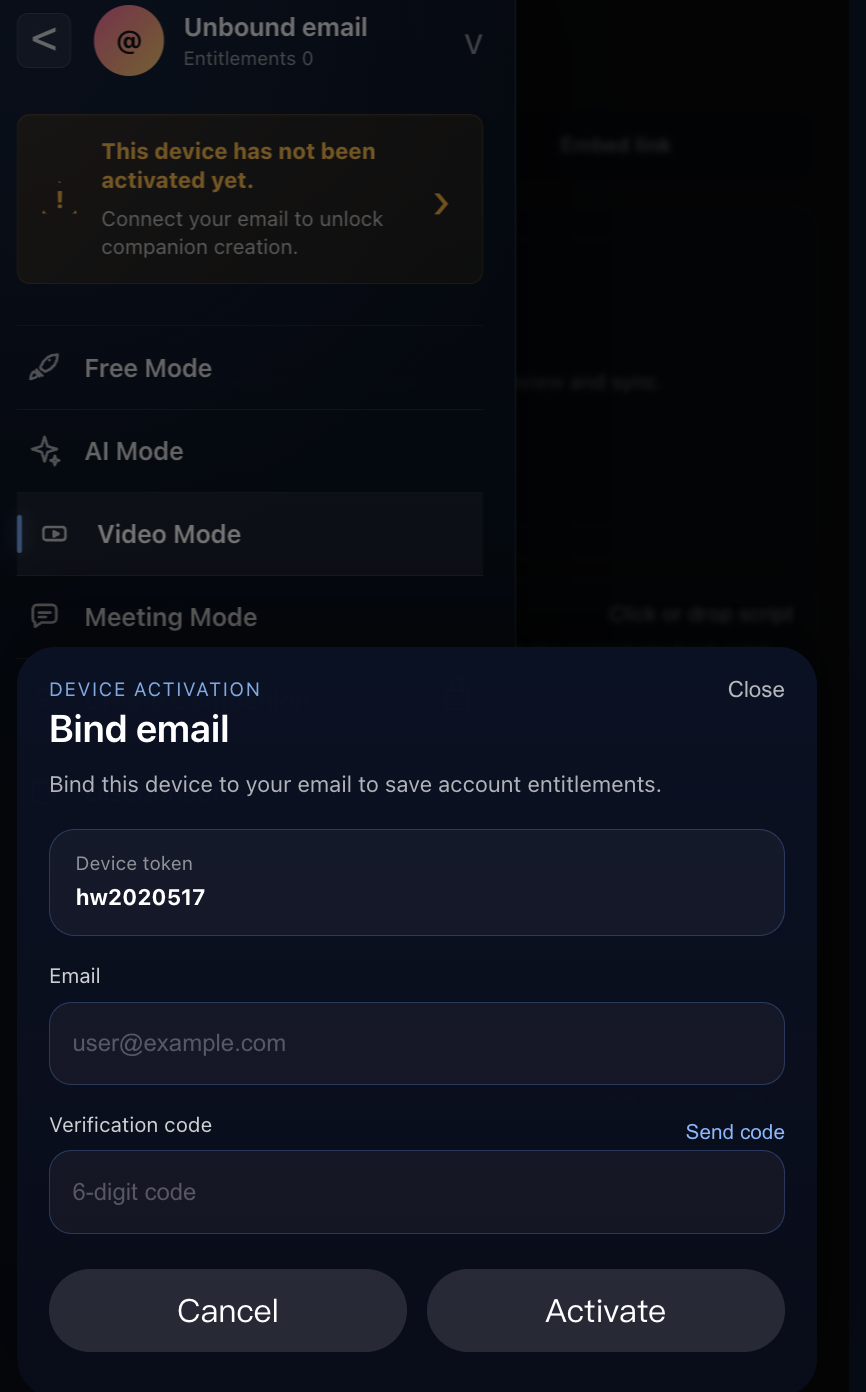
AI Companion requires the device to be bound to an email address. The app may ask you to activate email so it can save AI-related entitlements for the device.
After activation, custom AI companions and official recommended characters are associated with that email address. One email address can be bound to multiple devices.
Activation flow:
- Tap the unactivated-email prompt or email entry point.
- Enter your email address.
- Tap
Send codeto receive a verification code. - Enter the 6-digit verification code.
- Tap
Activateto finish activation.
No Traditional Account Flow
The current web app does not include traditional registration, login, or password recovery. This guide describes email activation as an activation step, not as a login flow.
No Email Unbind Entry Yet
Based on the current frontend, the product supports email binding/activation, status checks, and device authentication. It does not currently show a clear email unbind entry. If unbinding is added later, this guide should include a separate section for it.